SASSA e-KYC (Electronic Know Your Client) Verification Online
The South African Social Security Agency is addressing more than 3 million Social Relief of Distress (SRD) grant theft cases, as reported by South African Broadcasting Corporation News. In 2025, authorities presented 11 suspects before the court for using fabricated identities to access SRD grants, and the accused group included former employees of the South African Social Security Agency (SASSA).
In this difficult situation, the agency has started e-KYC (Electronic Know Your Client) verification on Friday, 24 January 2025. The Chairperson of the Social Development Committee, Ms Bridget Masango, has reactivated the e-KYC verifications across South Africa for SRD beneficiaries.
For 2026, all the SASSA R370 grant applicants and existing beneficiaries have to pass the e-KYC verification to get the R370 grant payments and SASSA status.
What is e-KYC (Electronic Know Your Client)?
According to Forbes, the first issuance of KYC was started by the Bank Secrecy Act (BSA) in 1970 in the US. Today, the majority of agencies are using this verification method. The meaning of this verification is:
e-KYC (Electronic Know Your Client) is a digital identity verification process that confirms the identity of an applicant through electronic records and biometric data. e-KYC verification allows organizations to validate personal information without requiring physical paperwork or in-person visits.
In the case of the SASSA, e-KYC verification is completed through a live identity check using a camera-enabled device such as a smartphone, tablet, or computer. The system captures a real-time facial image of the applicant and cross-verifies the identity details with records stored in the Department of Home Affairs database.
How to Do e-KYC Verification for SRD Grant?
You can perform your e-KYC verification for the SRD grant using two different methods:
1) Using Your Own Camera-Enabled Gadget at SRD Portal
The first and easiest way to complete your facial verification is to use your own camera-enabled device, such as a mobile phone or laptop, and mobile data. Once you have these things, you can follow these steps:
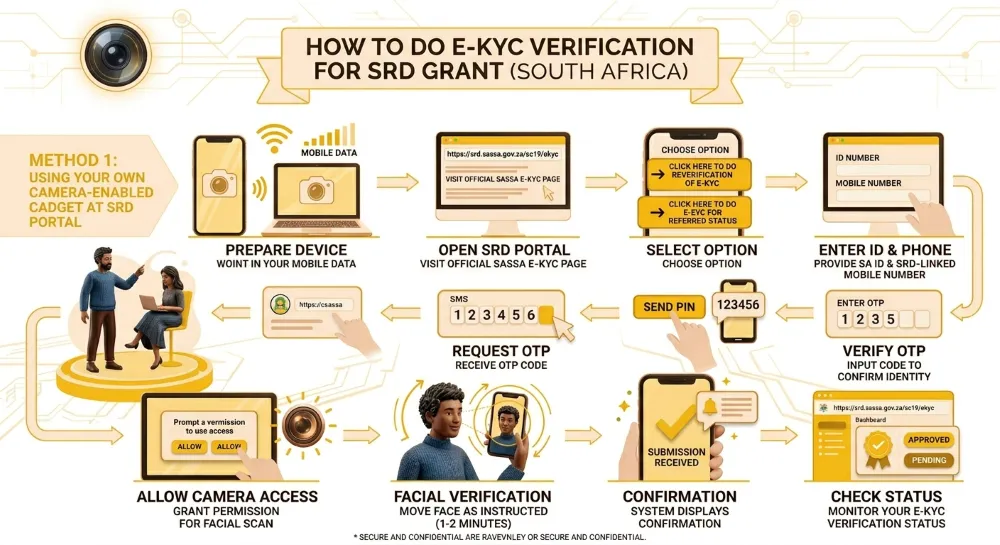
Open the official SRD e-KYC portal
- Visit the official SRD e-KYC verification page (https://srd.sassa.gov.za/sc19/ekyc) provided by the SASSA.
Select the correct verification option
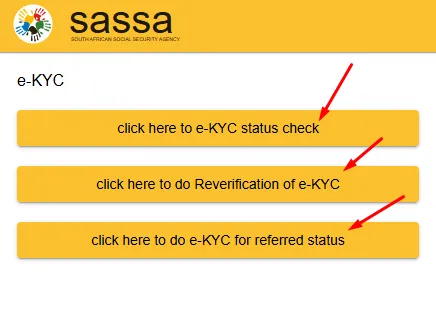
- Click “Click here to do Reverification of e-KYC” if you need to repeat verification.
- Click “Click here to do e-KYC for referred status” if your SRD application shows a referred status.
Enter your identification details
- Provide your South African ID number and the mobile phone number linked with your Social Relief of Distress (SRD) grant application.
Request the One-Time PIN (OTP)
- Click the “Send PIN” button to receive an OTP code on your registered mobile number.
- Verify the OTP code. Enter the received OTP code in the required field to confirm your identity and continue to the next step.
Allow camera access on your device
- The system will request permission to use your device’s camera.
- Grant permission to enable live facial verification.
- Complete the facial verification process.
Follow the on-screen instructions carefully
- Move your face according to the displayed directions.
- The verification process usually takes 1 to 2 minutes to complete.
- Wait for the confirmation notification.
- After successful submission, the system will display a notification confirming that your verification details have been received.
Check your e-KYC status regularly.
- Monitor your e-KYC verification status through the portal to confirm whether your identity verification is approved or pending.
2) Visit the SASSA Office or Kiosks
Applicants who do not have mobile data access or a camera-enabled device can complete e-KYC verification by visiting the SASSA office or the nearest SASSA kiosks. SASSA kiosks include built-in cameras and installed verification applications that support live identity checks.
Follow these numbered steps to complete e-KYC verification at a SASSA office or nearest SASSA kiosks:
- Visit the SASSA office or nearest SASSA kiosks: Locate the closest SASSA office or SASSA kiosk that provides e-KYC verification services.
- Request assistance from SASSA support staff: Inform the staff member that you want to complete e-KYC verification for the Social Relief of Distress (SRD) grant.
- Provide your identification details: Share your South African ID number and the mobile phone number linked with your SRD grant application.
- Use the kiosk device or official laptop: SASSA kiosks include a camera and verification application that are already installed.
- SASSA offices provide official laptops and guest Wi-Fi access for applicants who need to complete e-KYC verification.
- Enter your details into the verification system: Type your ID number and registered mobile number into the e-KYC application on the kiosk or laptop.
- Receive and verify the OTP code: The system will send a One-Time PIN (OTP) to your registered mobile number.
- Enter the OTP code into the system to confirm your identity.
- Complete the facial verification process: Stand in front of the kiosk or laptop camera.
- Follow the on-screen instructions and move your face as directed by the system.
Now the system will display a confirmation message after successful e-KYC submission. Visit the SASSA portal or return to the SASSA office or kiosk to check whether your e-KYC verification status is approved or pending.
How to Check SASSA e-KYC Status?
You can check SASSA e-KYC status on the official SRD web portal.
- Visit https://srd.sassa.gov.za/sc19/ekyc web portal.
- Choose the “Click here to e-KYC status check” button.
- Enter your SRD-linked phone number and South African ID number and get an OTP.
- Verify the OTP and check your e-KYC status.
Who Needs to Do e-KYC?
SASSA and the South African government have made it mandatory for all the SRD R370 grant applicants to pass the identity verification. Those beneficiaries who have turned 18 years old in 2022 and 2024 will get their status as “Refered”. So they also need to pass this verification.
Why is Facial and Biometric Verification Necessary for SRD Grant?
Facial and biometric verification is required in 2026 to stop identity fraud and protect Social Relief of Distress (SRD) grant funds. The South African Social Security Agency uses facial matching to confirm that each applicant matches records stored in the Department of Home Affairs database.
This verification blocks duplicate registrations and fabricated identities that caused more than 3 million SRD fraud cases in recent years. Biometric verification also ensures that only eligible citizens receive the R370 grant payment. Accurate identity confirmation protects public funds and maintains fair distribution of financial assistance across South Africa.